Wallets
Description
Wallets are currency specific virtual accounts which you can use to store funds, book Trades, create internal Transfers, external Payments and more. Wallets are critical to the central funds management flow of the Send Payments Ecosystem. Creation of Wallets under a Account allows a Customer to receive funds and subsequently book Trades and Payments.
A Wallet can be set up in a huge variety of currencies and each Account can have unlimited number of Wallets even for the same currency (contingent on your contract with Send).
To receive funds onto the platform you will need to create a PayIn Address for the Wallet. Each PayIn Address is unique to that Wallet. Each Transaction you make to a particular PayIn Address will be stored within the associated Wallet and can be referenced in GET requests.
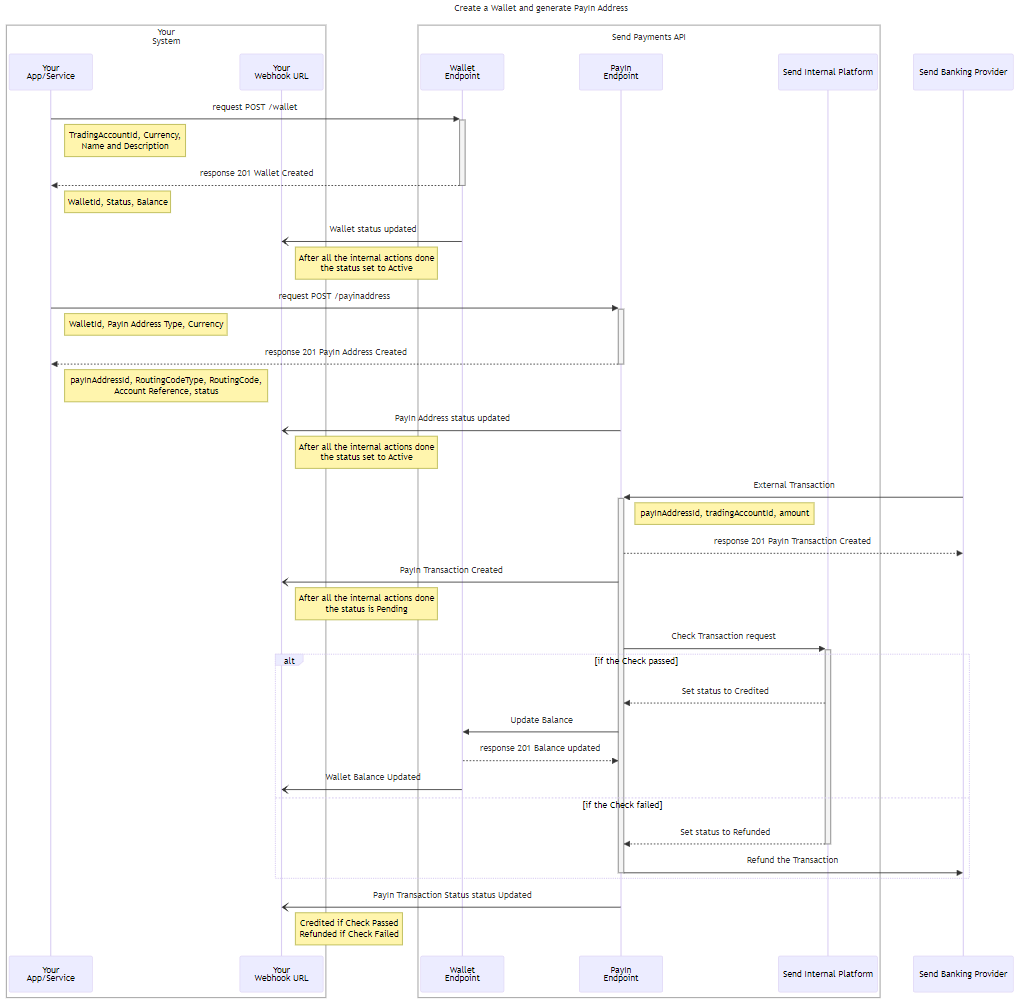
Wallets
How to create a Wallet
To create a Wallet you need to send a POST /wallets request including the accessToken you’ve received during the Authentication process in the headers.
Within the request you need to specify the accountId of the account for which the Wallet is created and also specify the wallet's currency, walletName and walletDescription.
You won’t be able to change the currency of the Wallet after creation.
walletName and walletDescription specified during creation are added for reference purpose and have no meaningful impact on the wallets functionality.
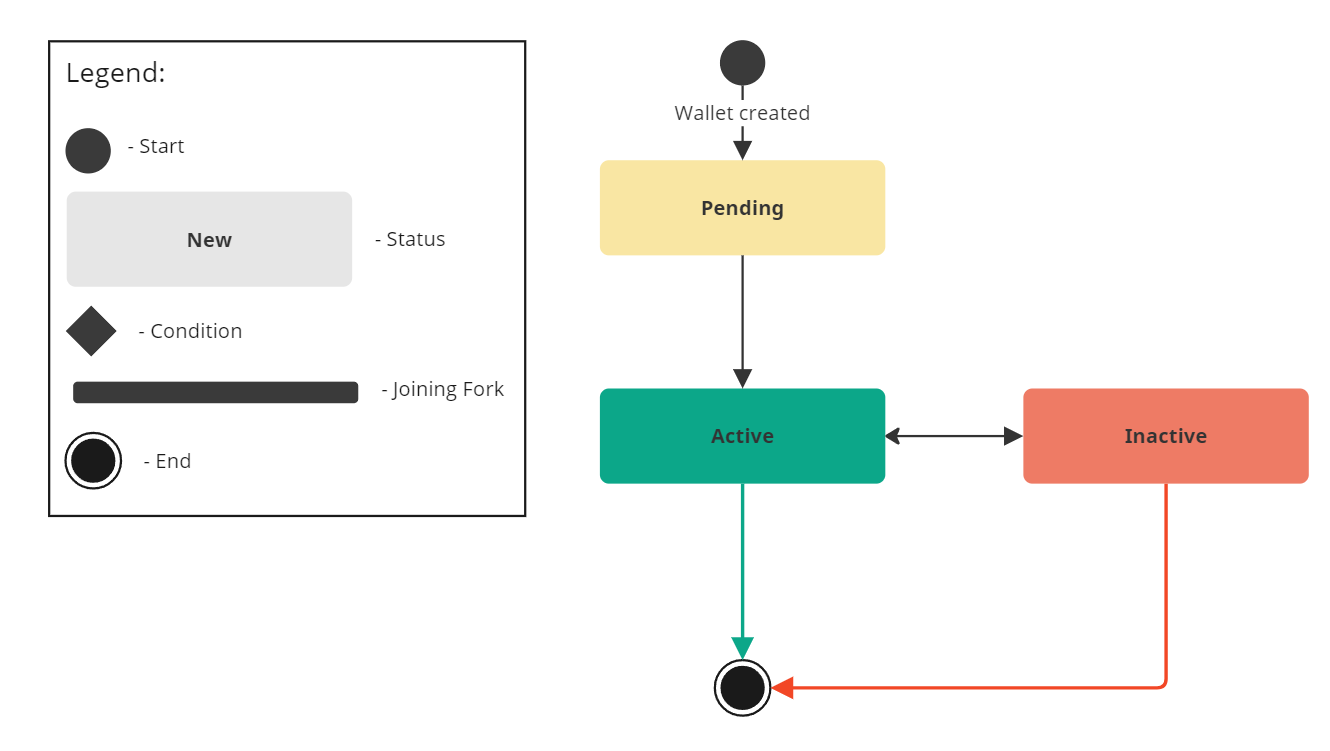
In the initial response when creating a wallet you should receive the Pending status. After the system performs all the actions to create the Wallet the status will change to Active. To receive updates on the Wallet status changes please refer to Webhooks.
Wallet Balances
Each Wallet has three different balances:
- Cash Balance - Equals the total amount of actual money held on the Wallet agnostic of any in flight transactions.
- Committed Balance - Equals the amount of money needed on the wallet in order to fund any in-flight/future trades/payments.
- Available Balance - Equals the amount of uncommited funds available to the wallet for things like payments. This equals the Total Balance minus the Committed Balance (but will never fall below 0)
Wallet currencies precision
All Wallet currencies maintain a precision of 2, signifying that a value of 100 is equivalent to 1.00 for all available currencies. For example:
11 = $0.11 (11 cents)
111 = $1.11 (111 cents)
22= £0.22 (22 pence)
222 = £2.22 (222 pence)
Wallet Status Flow
PayIn Addresses
How to create a PayIn Address
To create a PayIn Address you can send POST /payin-addresses request including the accessToken you’ve received during the Authentication process in the headers.
The request must contain the walletId of the Wallet for which you are creating the PayIn Address.
Besides that, the request should contain the payInAddressType (which can be either local bank transfer or international bank transfer). When local bank transfer is selected, you will be supplied with a Local Routing Code and Account Number. Otherwise, if international bank transfer is selected then you will be supplied with a SWIFT BIC and Account Number.
The Currency in the POST /payinaddresses request must match the currency of the Wallet
Currently all the PayIn Addresses are based in Australia and thus can be generated with either a BSB and Account Number or a SWIFT BIC and Account Number but we are working on additional domiciles. The name on the account will always be "SendFX Limited".
All the PayIn Addresses are NPP enabled
Request Example for POST /payin-addresses
Request Example for POST /payin-addresses
 {
  "walletId": "1a2b3c4d-5e6f-7g8h-9i0j-1k2l3m4n5o6",
  "payInAddressType": "local_bank_transfer"
}
In response to your request you will receive either a SUCCESS 201 response or one of the error responses (400, 401, 500) See Status Codes & Error Messages.
In case of successful response you will receive back all the information you’ve sent with payInAddressId, routingCodeType and routingCode, accountReference, status, createdAt and updatedAt dates and time.
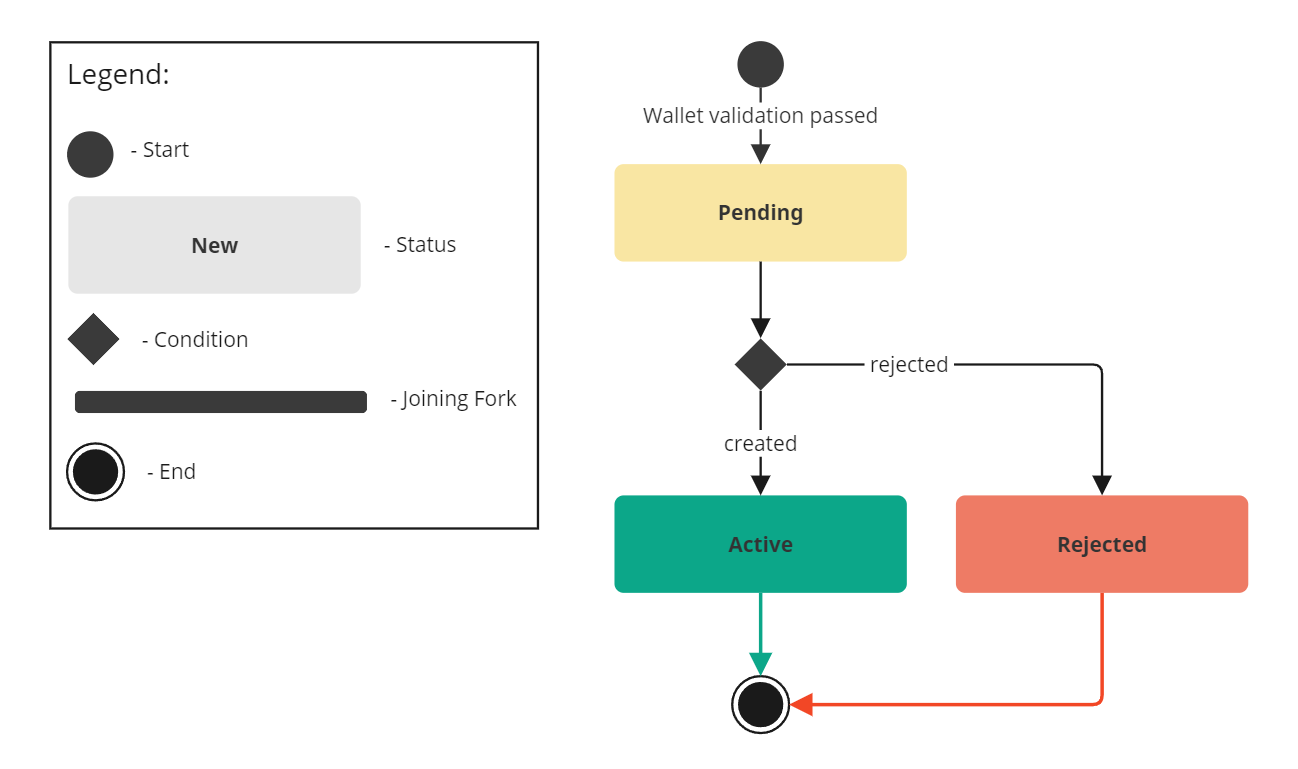
In the initial response you will receive the Pending status.
After the system performs all the actions to create the PayIn Address the status will change to Active
To receive updates on the PayIn Address status changes please refer to Webhooks.
Response Example for POST /payin-addresses
Response Example for POST /payin-addresses
{
  "item": {
    "payinAddressId": "string",
    "walletId": "1a2b3c4d-5e6f-7g8h-9i0j-1k2l3m4n5o6",
    "payinAddressType": "local_bank_transfer",
    "routingCodeType": "swift",
    "routingCode": "123456789",
    "accountReference": "5567778",
    "status": "pending",
    "createdAt": "2024-08-13T04:58:04.094Z",
    "updatedAt": "2024-08-13T04:58:04.094Z"
  }
}
PayIn Address Status Flow
PayIn Address Status Flow
PayIn Transactions
How do PayIn Transactions work
PayIn Transactions are created when a Customer sends money from their Bank to a previously generated PayIn Address.
PayIn Transaction payload contains the following:
payInTransactionIdUnique identifier of the PayIn TransactionpayInAddressIdUnique identifier of the attached PayIn AddresswalletIdUnique identifier of the Wallet which contains the attached PayIn AddressamountTransaction amountcurrency3-letter identifier of the Transaction currencystatusCurrent status of the Transaction (Pending/Credited/Refunded)payInAddressTypeEither local_bank_transfer or international_bank_transfersourceDetailsThe source response includes information about 'where' the PayIn originated from. These will vary depending on the originating institution and which of Send's banking partners are used. The format of this field is unstructuredremitterDetailsThe remitter response includes information about 'who' the PayIn originated from. These will vary depending on the originating institution and which of Sends banking partners are used. The format of this field is unstructuredcreatedAtThe timestamp with timezone for when the PayIn transaction was createdupdatedAtThe timestamp with timezone for when the PayIn transaction was updated
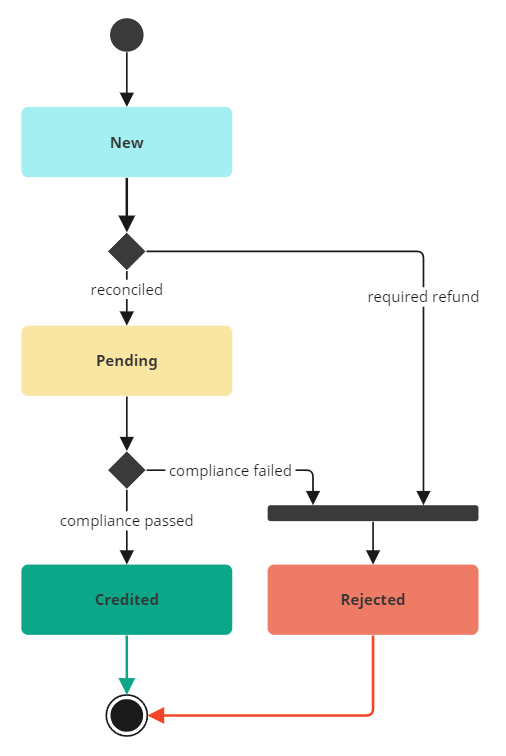
When Send’s banking providers notify that funds have been paid into a PayIn Address, a PayIn Transaction will be created in a Pending status. Send will undertake compliance monitoring on all transactions, and once complete they will be moved to one of the following statuses:
- Credited - if compliance monitoring passes, funds will be credited to the Wallet associated with the PayIn Address.
- Rejected - if compliance monitoring fails, funds will be returned to the sender.
PayIn Transactions Status Flow
Sequencing of Wallet Transactions
When operating at scale, a large number of pending/in-flight transactions can stack up against a single wallet. Understanding how a wallet will resolve a list of transactions is important to ensure a smooth customer experience.
Wallets within Send utilise a strict FIFO (first in, first out) internal queueing structure determined by the datetime the transaction entered the Awaiting Funds status (which for trades is the settlementDate - datetime). The Send wallet will utilise this sequence when attempting to draw funds down from a wallet to fund the transaction.
For Example, consider a wallet with a Cash Balance of $30,000. If Payment 1 is booked first for $40,000 and then Payment 2 booked for $10,000; Neither Payment 1 nor Payment 2 will settle until more funds are put into the wallet (either via a Transfer or a Pay In). If a further $10,000 is put onto the wallet (either via a pay-in, or a transfer) the Payment 1 will settle and be released leaving Payment 2 still in Awaiting Funds.
This FIFO queue is shared between Trades, Payouts and outbound Transfers (transfers which are going from that wallet into another one), meaning an unfunded Trade which has passed it's settlementDate first will block any subsequent Trades/Payments/Transfers until it is funded.
Fetching Information
Fetching all Wallets for the Account
To request all the Wallets for the specific Account you can send a signed GET accounts/{accountId}/wallets request.
In response to your request you will receive either a SUCCESS 200 response or one of the error responses (400, 401, 500). See Status Codes & Error Messages.
Given a valid accountId in the API key, a SUCCESS response will return the information for all the Wallets for a specific Account.
Note that standard pagination rules are applied for the response.
Fetching a previously created Wallet
To request the information for a given Wallet you can send a signed GET /wallets/{walletId} request.
In response to your request you will receive either a SUCCESS 201 response or one of the error responses (400, 401, 500). See Status Codes & Error Messages.
Given a valid walletId in the URL, a SUCCESS response will return the information for the given Wallet
Note that standard pagination rules are applied for the response.
Fetching all PayIn Addresses for the Wallet
To request all the PayIn Addresses for the specific Wallet you can send a signed GET wallets/{walletId}/payin-addresses request.
In response to your request you will receive either a SUCCESS 200 response or one of the error responses (400, 401, 500). See Status Codes & Error Messages.
Given a valid accountId in the API key, a SUCCESS response will return the information for all the PayIn Addresses for a specific Wallet.
Note that standard pagination rules are applied for the response.
Fetching all PayIn Transactions for the Wallet
To request all the PayIn Transactions for the specific Wallet you can send a signed GET wallets/{walletId}/payins request.
In response to your request you will receive either a SUCCESS 200 response or one of the error responses (400, 401, 500). See Status Codes & Error Messages.
Given a valid accountId in the API key, a SUCCESS response will return the information for all the PayIn Transactions for a specific Wallet.
Note that standard pagination rules are applied for the response.
Fetching a previously created PayIn Transaction
To request the information for a given PayIn Transaction you can send a signed GET /wallets/{walletId}/payins/{payinId} request.
In response to your request you will receive either a SUCCESS 201 response or one of the error responses (400, 401, 500). See Status Codes & Error Messages.
Given a valid walletId and payinId in the URL, a SUCCESS response will return the information for the given PayIn Transaction
Note that standard pagination rules are applied for the response.
Not Seeing What You're Looking For?
We are always looking to improve our API documentation to ensure Sends systems are easy to understand and quick to build against. If you're struggling to find the answer to a question we either haven't made it easy enough to find the relevant docs or we haven't had a chance to write something up for it yet.
Either way we want to hear from you!

On this page
- Wallets