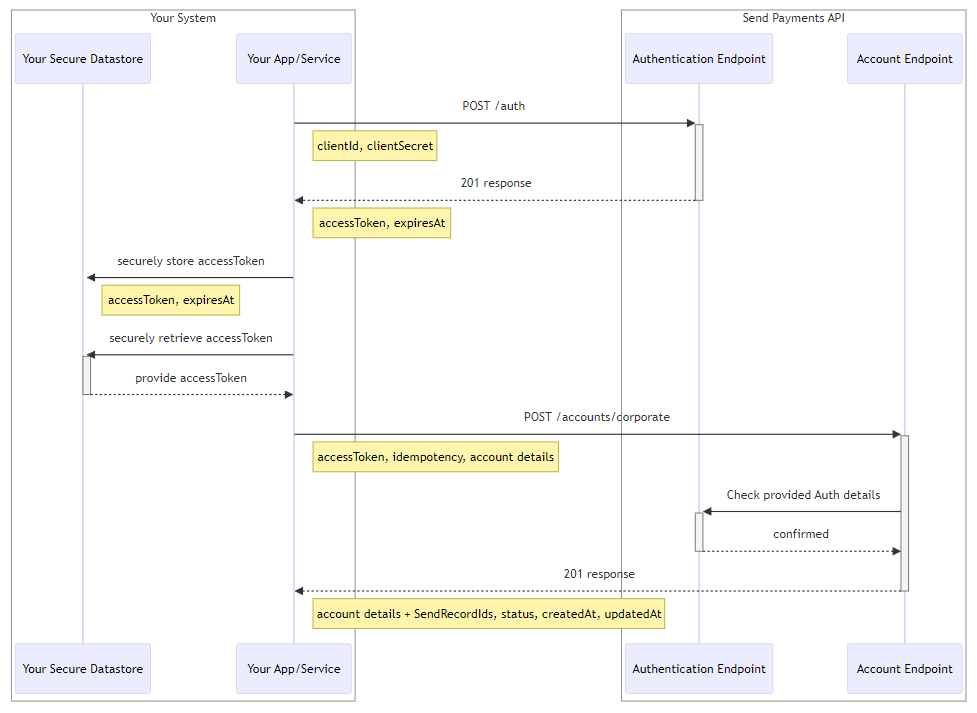
Guide for using our POST/Auth endpoint.
Description
All interactions with the Send Payments API start with obtaining an Authentication Token, which is further referred to as an accessToken. You will need this to access all the Endpoints except the Authentication Endpoint itself.
To obtain an accessToken, your API will need to send a request to the Authentication Endpoint and if successfully authenticated, a successful response will be sent to you containing an accessToken which you will be able to use to sign all the subsequent requests, until the accessToken expires or you request a new one.
The accessToken holds information about which services that are available to you as an authenticated user.
Send Payments API accessTokens expire after 5 minutes. You can obtain a new accessToken before your current one expires.
How to obtain an accessToken and sign requests
First you need to obtain a Client Identifier from Send. This is an environment specific user identifier for your API. At the same time, you will need to set up the clientSecret associated with your clientId, which is the password for your API account.
You should securely store your clientId and clientSecret and you should not share these publicly.
To obtain an accessToken and use it to sign the requests you need to send a POST /auth request. Within the request you need to provide your clientId and clientSecret.
This endpoint will always respond with a new accessToken.
In response to your request you will receive either a SUCCESS 201 response or one or the error responses (400, 401, 500) See Status Codes & Error Messages.
In case of successful Authentication you will receive back your accessToken and expiresAt date and time.
The accessToken is a string representing a JSON Web Tokens (JWT). JSON Web Tokens are an open, industry standard RFC 7519 method for representing claims securely between two parties.
The accessToken you've received will remain valid until you request a new one or until the expiry time. If the accessToken expires then you'll need to repeat the authentication process. Youll need to include an accessToken on all requests to endpoints other than the POST /auth.
Now that you have an accessToken you can use this to access the endpoints offered by the Send Payments API. The accessToken contains information about which services you can access so it must be present on all requests to endpoints that require an authenticated user.
i.e. all endpoints except the POST /auth endpoint itself.
Here's an example of a signed request to create a new Account: